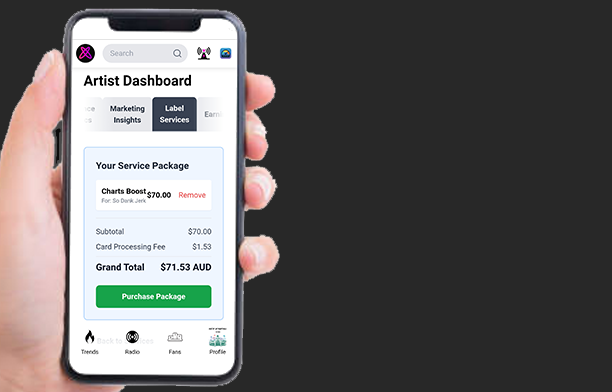
Fame, Exposure, and Fans.
Written by Atomic Newsroom on 11 July 2025
The Big Picture:
You have made great music and cracked the Top 20. You have proven people want to hear your sound.
But getting to Number 1 – and staying there – takes more than luck.
Local legends rely on hope. National icons have a plan.
To become a household name, you need to stop guessing. You need to know exactly who loves your music, where they live, and how to turn a casual listener into a superfan who buys tickets and merch.
This guide shows you how to use Label Services to get massive exposure. We will show you how to read your data to find your fans, and how to use our tools to get your music heard by thousands of people.
Let’s look at the stats that actually matter.
1. Audience Metrics: Who Is Actually Listening?
Stop Guessing. Start knowing.
To build a career, you need to know the difference between someone hearing you once and someone listening on repeat.
Step 1. Go to your Artist Dashboard.

Step 2. Tap Audience Metrics.

Two Types of Streams (The “Sticky” Test)
Your dashboard splits streams into two colors. This is your quick health check.
- 🟠 Discovery Streams (The “Hello”): These are strangers finding you for the first time via the Trends feed or Atomic Radio.
- The Vibe: High orange numbers mean your cover art and song intro are fire—you are stopping the scroll.
- 🔵 Leisure Streams (The “Relationship”): These are fans coming back for more. They searched for you or played you from a playlist.
- The Vibe: This is the most important stat. It means your song stuck.
Step 3. Search and display individual Song metrics
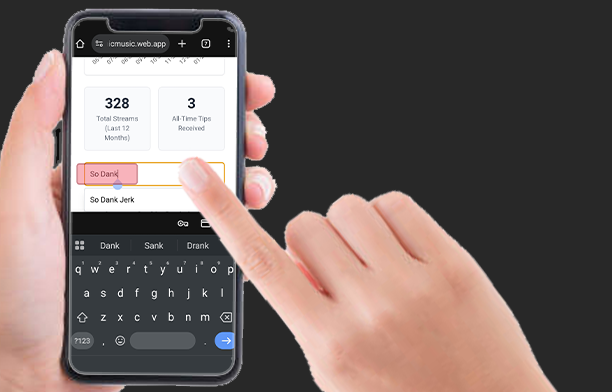
Pro Tip: Watch the Blue Line If you have high Orange (Discovery) but low Blue (Leisure), you are getting attention but not keeping it. You want to see that Blue line rising – that means you are building a fanbase, not just getting plays.

The Streams Graph allows you to track these metrics over the last 12 months.
- Analyze the Spikes: When you see a spike in Orange (Discovery), check your marketing calendar. Did you release a Press Post? Did you get a radio spin?
- The Long Tail: After a marketing push (an Orange spike), you want to see the Blue line (Leisure) establish a new, higher baseline. This indicates that your campaign successfully captured long-term fans.
Turn Stats Into Hype
Your dashboard tracks your progress toward the Radium / Nuclear Awards.
These aren’t just badges. They are press opportunities. When you hit a certification, tell the world. Fans love backing a winner, and posting about an award creates a second wave of hype for the song.
Where is the money?
Step 1. Tap the Earnings tab

Step 2. View Transaction History
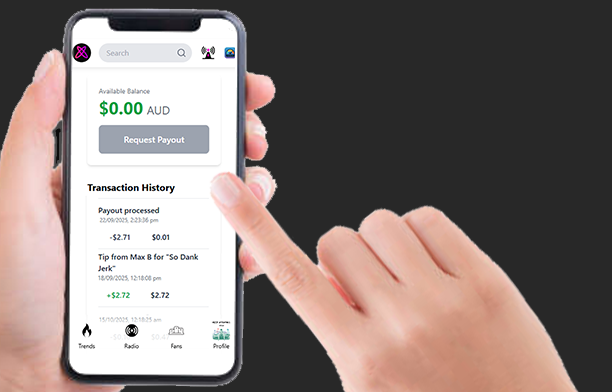
Tips aren’t just cash; they are signals. A fan who tips is a fan who will buy a ticket to your show. Watch who is tipping and for which song
Step 1. Open Artist Notifications
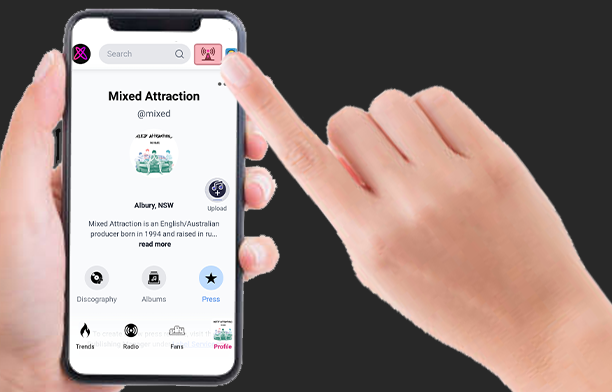
Step 2. Open the Royalties section
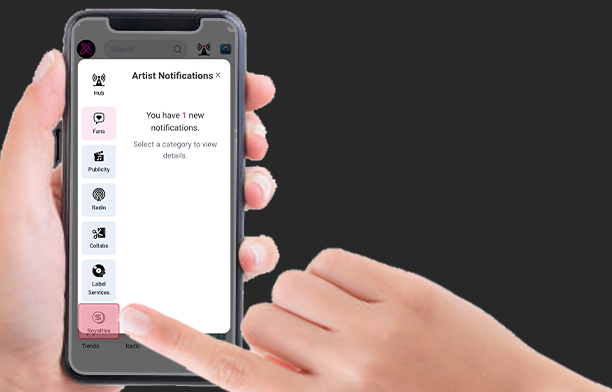
Step 3. View your Royalty transactions

2. Marketing Insights: The Fan Journey
The Fan Funnel in your Marketing Insights tab is your roadmap. It shows you exactly how many people are moving from “Just heard you” to “Superfan.”
Step 1. Open the Marketing Insights tab

Step 2. Scroll down to Your Fan Funnel.
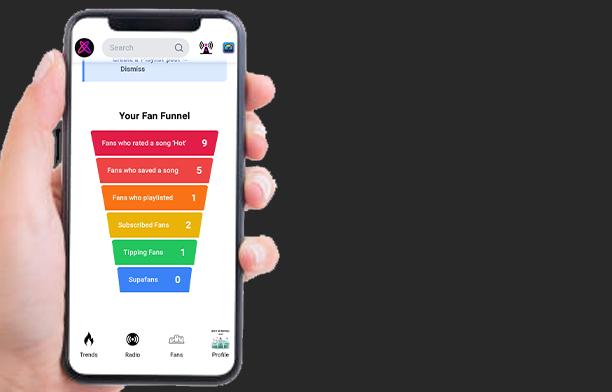
Here is how to read it – and how to fix the leaks using our tools.
Tier 1: The Crowd (Awareness)
Metric: Fans who rated a song ‘Hot’.
- The Vibe: These people dig your sound. This is your potential audience.
- 📉 Low Number? You have an Exposure Problem. You need more ears on the track.
- 🔥 The Fix:
- Free: Share your song link on socials and DM friends asking them to rate it.
- Fast Track (Label Services): Use Chart Boost (Catalog Manager) to get your song into high-visibility slots, or Radio Placement to get spun on Atomic Radio.
Tier 2: The Listeners (Retention)
Metric: Fans who Saved or Playlisted a song.
- The Vibe: These people want to hear you again. They are ready to become fans.
- 📉 Low Number? You have a “Stickiness” Problem. People hear you, but they aren’t keeping you.
- 🔥 The Fix:
- Free: Post a Press Release asking fans specifically to “Add to Playlist.”
- Fast Track (Label Services): Use the Playlist Feature service (Catalog Manager) to secure spots on popular playlists automatically.
Tier 3: The Tribe (Connection)
Metric: Subscribed Fans.
- The Vibe: This is your “Owned Audience.” When you post, these people see it automatically. You don’t have to fight for their attention anymore.
- 📉 Low Number? You have a Story Problem. People like the song, but they don’t know you.
- 🔥 The Fix:
- Free: Post behind-the-scenes content. Show the personality behind the music.
- Fast Track (Label Services): Use Fan & Media Distribution (Press Manager) to boost your story into more feeds.
Tier 4: The Superfans (Funding)
Metric: Tipping Fans & SupaFans.
- The Vibe: The holy grail. These fans aren’t just listening; they are funding your career.
- SupaFans: Fans who have tipped over $50. Soon, they will get exclusive perks like early bird tickets and “First Listen” alerts.
- 📉 Low Number? You aren’t giving them a reason to support you.
- 🔥 The Fix:
- Free: Gamify it. Run a competition where a tip is the entry fee. Shout out every tipper personally using Artist Notifications – make them feel famous.
- Fast Track (Label Services): Use Fan Distribution to boost that competition post to your whole audience so nobody misses it.
🚀 The Nuclear Option: Radio Services If your numbers are low across the board, you need a massive injection of new listeners. Radio Servicing puts your track on National FM & Atomic Radio, advertising your sound to a mass audience to flood your funnel with new blood.
3. How to Use Label Services
Ready to boost your numbers? Here is how to use the tools.
Pro Strategy: Focus on promoting one song at a time. It is much better to have one hit song that everyone knows than a whole album that nobody listens to.
How to set up Fan Distribution
Use this to get your Press Posts into more news feeds.
Step 1. Open the Press Manager
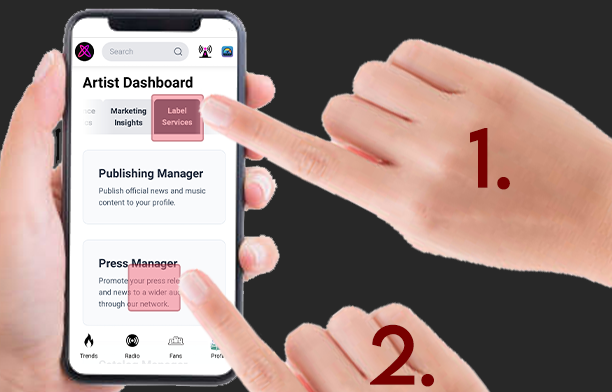
Step 2. Tap the “Fan Distribution” card
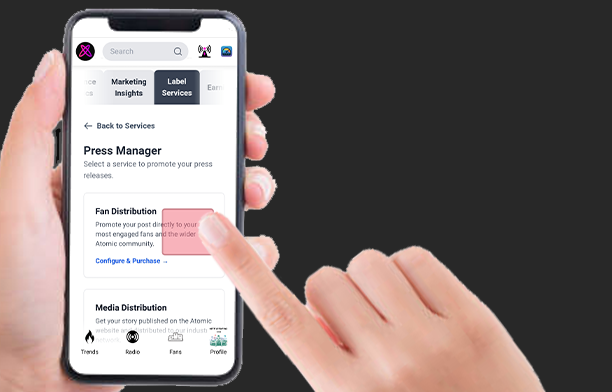
Step 3. Search for your Press Post
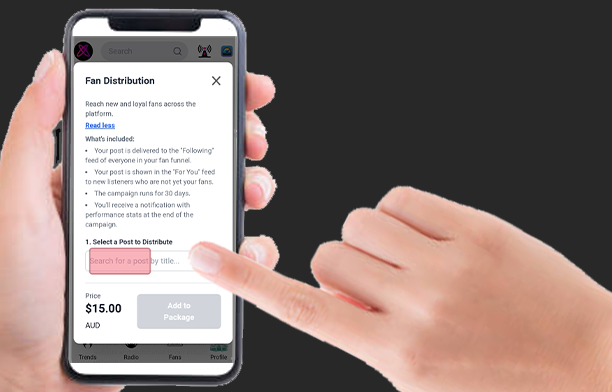
Step 4. Select it and tap ‘Add to Package’.
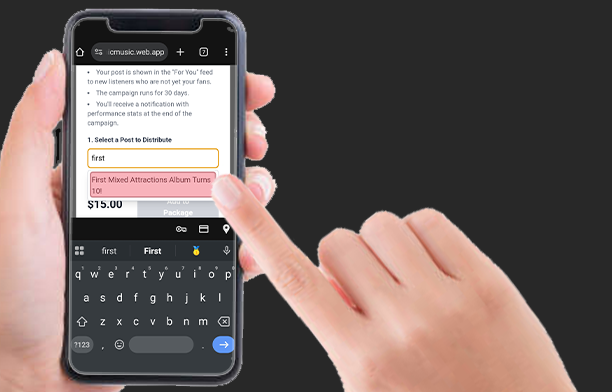
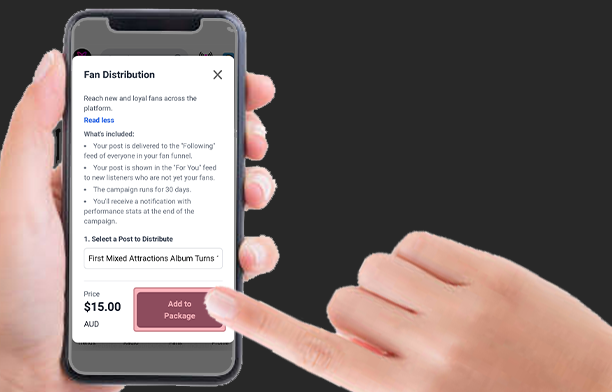
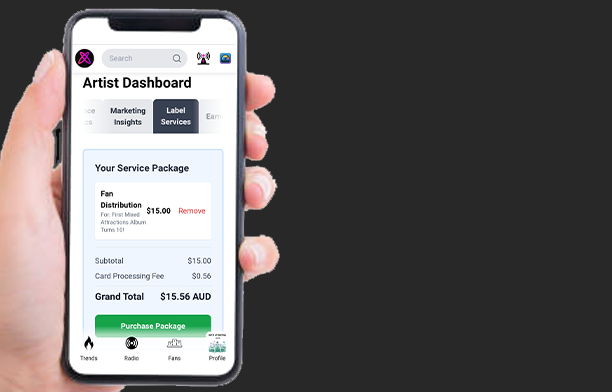
Step 6. Check the Summary and tap ‘Purchase Package’ to finish.
How to set up Media Distribution
Use this to send your news to a wider industry audience.
Step 1. Open the Press Manager and select Media Distribution
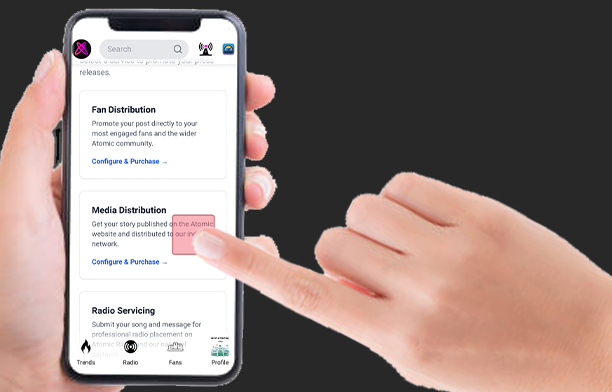
Step 2. Choose a Placement Type and select your Press Post (or upload content).
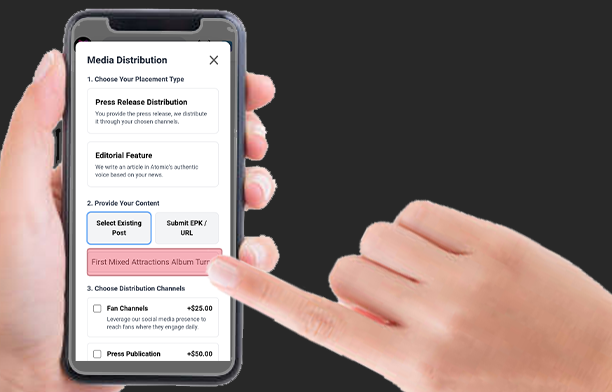
Step 3. Pick your Distribution Channels and tap ‘Add to Package’.
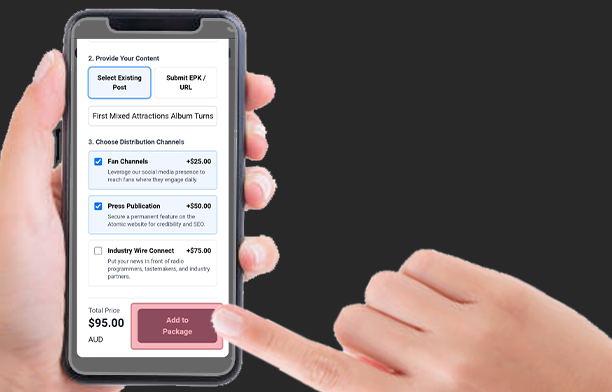
Step 4. Tap ‘Purchase Package’ to checkout.
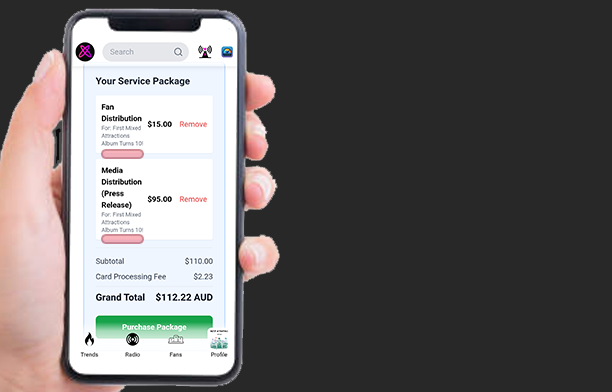
How to set up Radio Servicing
Use this to get your song or interview on the air.
Step 1. Open the Press Manager and select Radio Servicing
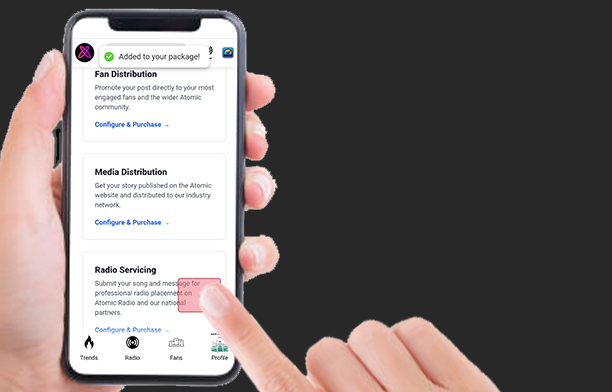
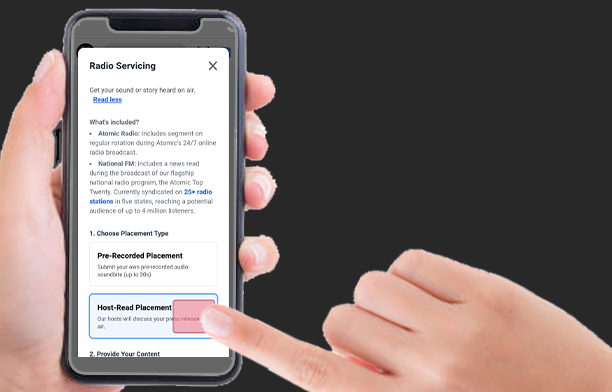
Step 2. Choose a Placement Type. Upload your pre-recorded content if needed.
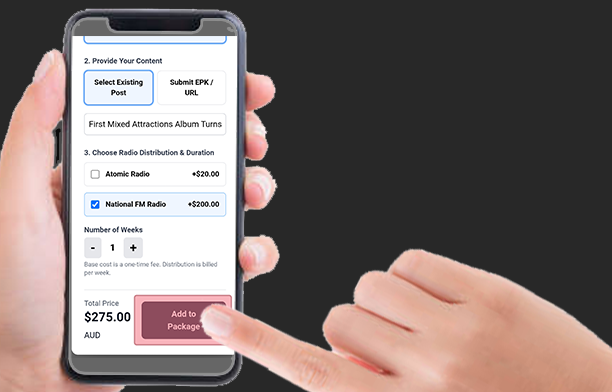
Step 3. Pick your Distribution Channels, set how long you want it to run, and tap ‘Add to Package’.
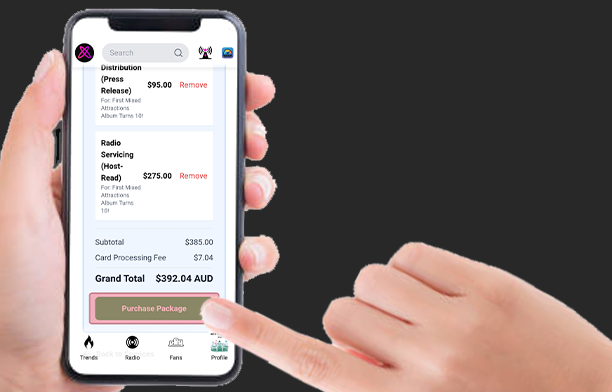
Step 4. Tap ‘Purchase Package’ to checkout.
How to use the Catalog Manager
Use this to boost specific songs in charts and playlists.
Step 1. Open the Label Services section and select Catalog Manager.
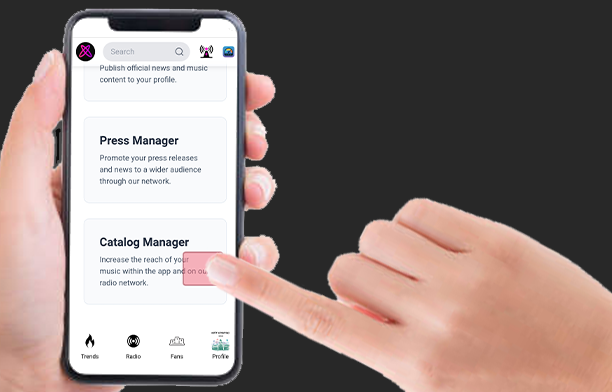
Step 2. Tap on a Service Card (like Chart Boost or Playlist Feature).
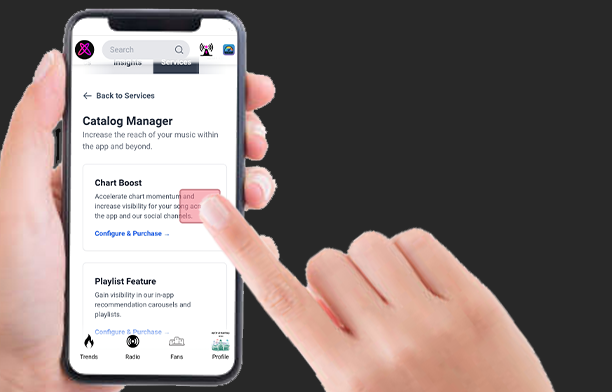
Step 3. Search for the song you want to promote.
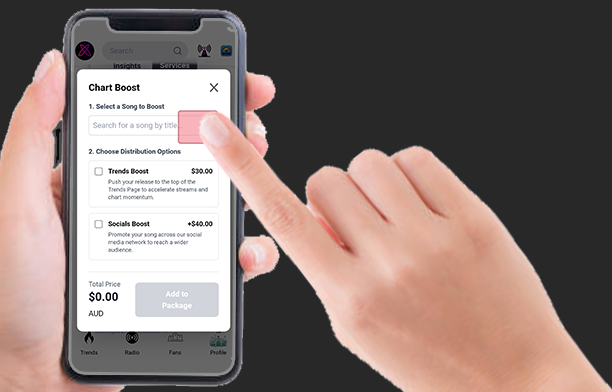
Step 4. Confirm your choices and tap ‘Add to Package’.
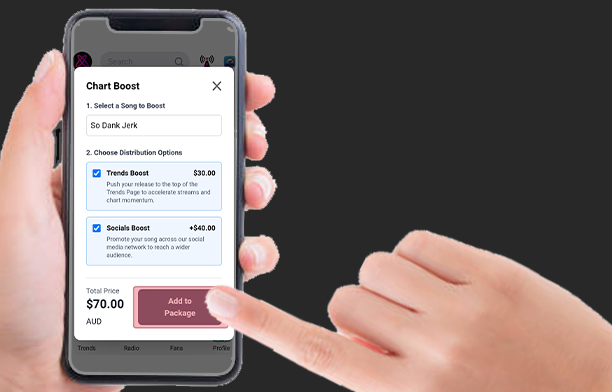
Step 5. You can combine services from the Press Manager and Catalog Manager into one single checkout.