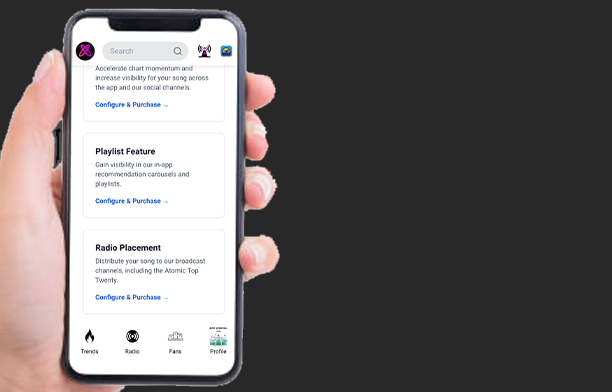
How To Grow & Monetize Your Audience!
Written by Atomic Newsroom on 6 January 2026
Background:
You have successfully navigated the initial phase of Self-Propelled Promotion, validated your sound and demonstrated that there is a hungry market for your music.
However, what got you here will not get you there.
Moving from a “local success” to a National Household Name requires a shift in strategy. It requires moving from “hoping” to engineering through data.
At this stage of your career, you are no longer just a musician; you are a marketer. To dominate the Top 10, you must understand the Unit Economics of your fanbase. This means knowing exactly who your listeners are, what triggers them to engage, and how to convert a passive stream into an active, monetizable fan relationship.
This tutorial covers the advanced Label Services methodologies we use for high-potential artists. We will teach you how to interpret your audience metrics and marketing insights to build a Fan Funnel – an automated system that brings in new listeners and high-value opportunities like clockwork.
This is the difference between a hobby and a career. Let’s dig into the data.
1. Audience Metrics Explained
Stop Guessing. Start Engineering.
To build a sustainable career, you need to understand the difference between someone hearing your music and someone listening to it. The Audience Metrics tab on your Artist Dashboard is the engine room of your Fan Funnel.
Here is how to interpret the data to drive decision-making:
Step 1. Navigate to the Artist Dashboard (Artist Profile)

Step 2. Open the Audience Metrics section

Two Types of Streams
Your dashboard splits streaming data into two distinct categories. Understand the relationship between these two to assess your “Stickiness”.
- 🟠 Discovery Streams (The “Hello”): These are plays generated by the discovery algorithm, i.e. the ‘Trends’ feed & Atomic Radio.
- What it means: This measures your Reach. These listeners are discovering you for the first time. High Discovery numbers mean your cover art and song intro are working, they are stopping the scroll.
- 🔵 Leisure Streams (The “Relationship”): These plays come from existing fans who actively seek you out – via search, your discography, their history, or saved playlists.
- What it means: This measures your Retention. A listener liked what they heard in the Trends feed enough to come back and listen again.
Step 3. Use the Search Bar to display individual Song statistics
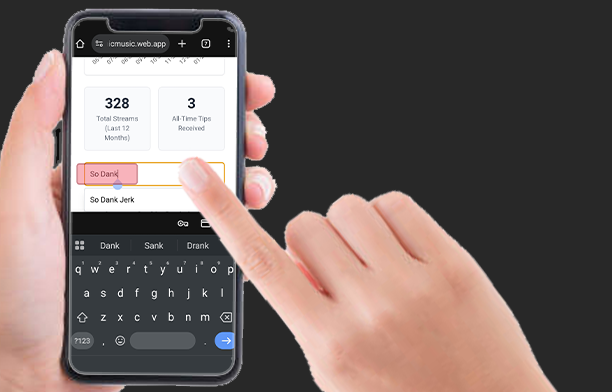
The “Orange-to-Blue” Ratio
Don’t just look at total streams. Look at the conversion from Discovery (Orange) to Leisure (Blue).
- High Orange / Low Blue: You have great initial appeal, but the song isn’t “sticking.” You are getting attention but not retaining fans.
- Rising Blue: This is the Holy Grail. It means your “Discovery” listeners are converting into true fans who are putting your track on repeat.

The Streams Graph allows you to track these metrics over the last 12 months.
- Analyze the Spikes: When you see a spike in Orange (Discovery), check your marketing calendar. Did you release a Press Post? Did you get a radio spin?
- The Long Tail: After a marketing push (an Orange spike), you want to see the Blue line (Leisure) establish a new, higher baseline. This indicates that your campaign successfully captured long-term fans.
Turn Momentum into Marketing Assets.
Your dashboard tracks your progress toward exclusive Atomic certifications, such as the Radium Nuclear Awards. More than digital badges; these are powerful tools for social proof and PR.
- Progress Bars: You can view the progress percentage for individual tracks toward these awards.
- The “Tip” Driver: Fan tips are the primary fuel for these certifications. For example, a Radium Award requires 10 unique tips to achieve certification.
Marketing Insight: Attaining a certification is a “Press Event.” When you hit a milestone (like the Radium Award), use that news to create a second wave of interest in the song. Fans love backing a winner.
How to Monitor Tipping Trends:
Step 1. Open the “Earnings” Artist Dashboard Menu Tab

Step 2. View Transaction History
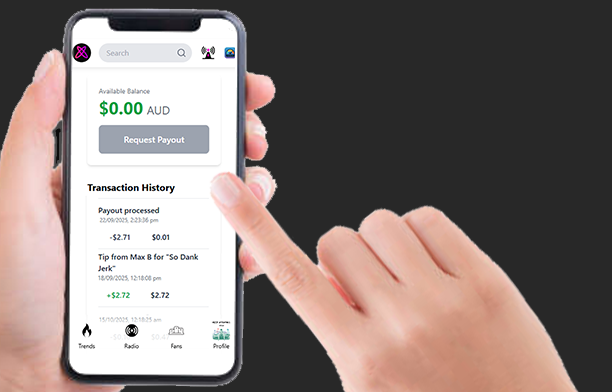
Tips are data points indicating your most dedicated listeners. You need to know who they are, what they tip, and for which songs.
Here you will also find transactions for withdrawals and Label Service purchases.
You can also view detailed tip transactions in your Artist Notification Hub:
Step 1. Open Artist Notifications
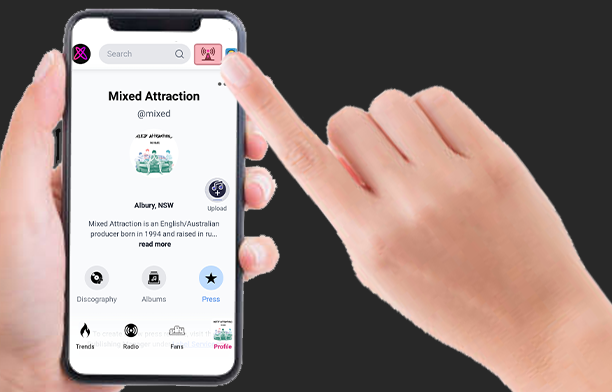
Step 2. Open the Royalties section
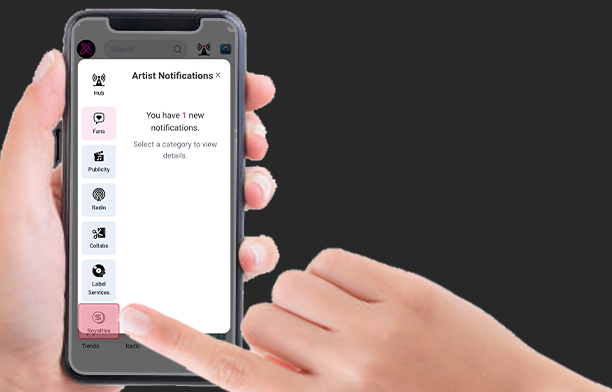
Step 3. View your Royalty transactions

2. Marketing Insights Explained
Visualize Your Conversion Engine
The Fan Funnel is the most powerful tool in your dashboard. It visualizes the depth of your relationship with your audience and tells you exactly where you are losing listeners and what specific action you need to take to fix it.
How to Analyze your Fan Funnel:
Step 1. Open the “Marketing Insights” Artist Dashboard Menu Tab

Step 2. Scroll down to view your Fan Funnel
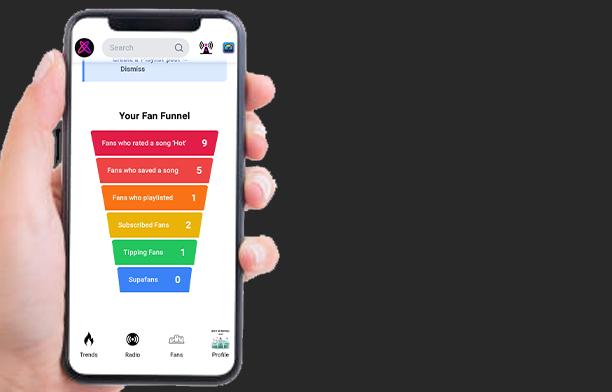
Decoding The Funnel
The funnel is a tally of user actions across your entire discography. It is widest at the top (casual interactions) and narrowest at the bottom (commercial transactions). It represents a typical “fan journey” as the listener experiences going from discovering a new song, to becoming a SupaFan.
Tier 1: The Top of Funnel (Awareness)
- Metric: Fans who rated a song ‘Hot’
- What it means: This is your “Addressable Audience.” These listeners have validated your quality. This metric is the bare minimum required to target specific users with advanced Label Services.
- Diagnosis: If this number is low, you have an exposure problem. You need more ears on the music.
- How to fix it:
- Organic Method (Free): Create and share a Press Post (with ‘More Streams’ as the goal) or Song URL directly to your social media or via DM to engage fans to rate (Reference: How To Dominate the Top Twenty tutorial).
- Label Service (Paid): Use the Chart Boost service (Catalog Manager) or Fan & Media Distribution (Press Manager) to force your track/press release into high-visibility feeds.
- Label Service (Paid): Use the Radio Placement service (Catalog Manager) and select “Online Broadcast” to accrue exposure to new fans via Atomic Radio.
Tier 2: The Middle Funnel (Retention)
- Metric: Fans who Saved / Playlisted a song
- What it means: High Intent. These listeners didn’t just like the song; they want to ensure they hear it again. They are chemically primed to receive updates about new releases or certifications.
- Diagnosis: If this number is low, you have a “stickiness” problem. People hear you, but they aren’t keeping you.
- How to fix it:
- Organic Method (Free): Create a Press Post with the specific ‘Playlist Adds’ Goal and share that URL link manually to your network.
- Label Service (Paid): Use the Playlist Feature service (Catalog Manager) to secure playlist placement recommendations , or Fan & Media Distribution (Press Manager) to force your press release into high-visibility feeds.
- Label Service (Paid): Use the Radio Servicing and/or Placement services (Press & Catalog Manager) to accrue exposure to new fans via Atomic Radio.
Tier 3: The Loyalty Layer (Connection)
- Metric: Subscribed Fans
- What it means: This is your “Owned Audience.” Once a fan subscribes, your Press Posts appear in their ‘Following’ Feed organically. You no longer have to “pay” to reach them; you have earned their attention.
- Diagnosis: If this number is low, you have a “loyalty” problem. People enjoy listening, but they aren’t invested in your journey.
- How to fix it:
- Organic Method (Free): Create a Press Post with the ‘Subscribe’ Goal and appeal to why listeners should follow your story. Entertainment value is key. Regular behind-the-scenes content that they enjoy seeing will persuade them to subscribe. Share that URL link manually to your network.
- Label Service (Paid): Use the Fan & Media Distribution (Press Manager) to force your press release into high-visibility feeds.
- Label Service (Paid): Use the Radio Servicing and/or Placement services (Press & Catalog Manager) to accrue exposure to new fans via Atomic Radio.
Tier 4: The Bottom Line (Monetization)
Metric: Tipping Fans & SupaFans
What it means: This is the economic engine of your career. These users have moved from consuming art to funding it.
- Tipping Fans: Listeners who validate your work with financial support.
- SupaFans: The elite tier. A fan who supports so prolifically they have passed a specific tipping benchmark (currently $50).
- The Perk: SupaFans receive exclusive access to giveaways, early bird tickets, and merch. (Coming Soon)
- The “Ding”: They are notified with a priority alert (a “ding”) the moment you post a new song or Press Post, ensuring your best customers always see you first. (Coming Soon)
Diagnosis: If this number is low, you have a “Conversion” problem. You are successfully entertaining listeners, but you haven’t given them a compelling reason to open their wallets. You are engaging their ears, but not their hearts (or their FOMO).
How to fix it:
- Organic Method (Free): Gamify the support. Create a Press Post with the ‘Tip’ Goal. Instead of just asking for money, create an offer they can’t refuse. Run a competition or giveaway where the entry fee is a tip of any amount.
- Strategy: Use the Artist Notifications feature to publicly thank new tippers. This social proof encourages others to tip to get the same recognition.
- Label Service (Paid): Use Fan & Media Distribution (Press Manager) to boost your ‘Tip’ Goal Press Post (your competition/giveaway). This ensures your offer reaches your entire audience, not just those currently looking at your feed.
- Label Service (Paid): Radio Placement/Servicing (Catalog/Press Manager). High rotation on Atomic Radio builds the familiarity required for listeners to feel emotionally attached to the artist, increasing the statistical likelihood of soliciting tipping.
💡 The “Force Multiplier”: Radio Services If your entire funnel looks thin (low numbers from top to bottom), you need a massive injection of new listener awareness.
Radio Servicing & Placement act as “Force Multipliers.” By securing spots on National FM & Atomic Radio, you advertise your songs (and the story behind them) to a mass audience, piquing interest with new listeners across your funnel and building the familiarity required to convert them into fans.
Next Step: Now that you have identified where your funnel is leaking, let’s look at the advanced tools used to fix it. Move on to Tutorial #3: How to Use Label Services.
3. How to Use Label Services
Strategic Focus: As mentioned in previous tutorials, focusing your promotional efforts on a single track helps fill this progress bar faster. It is far more valuable to have one certified hit track than an album full of low-traction songs.
How to set up Fan Distribution:
Step 1. Open the Press Manager
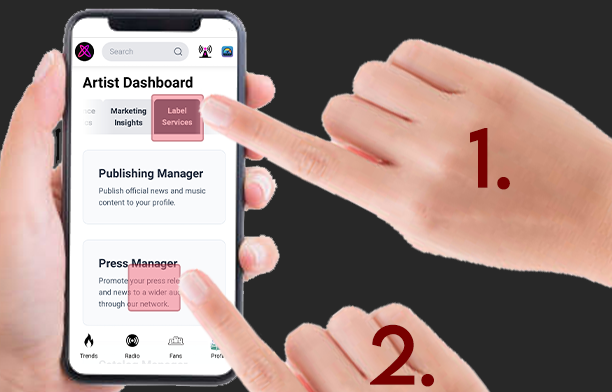
Step 2. Tap on the “Fan Distribution” card
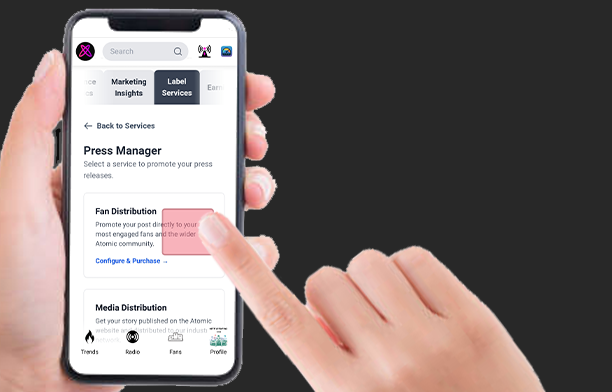
Step 3. Search for a Press Post in the Search bar
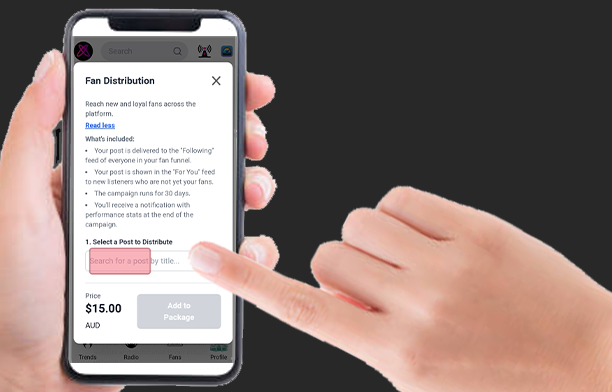
Step 4. Confirm a Press Post selection from the drop down list
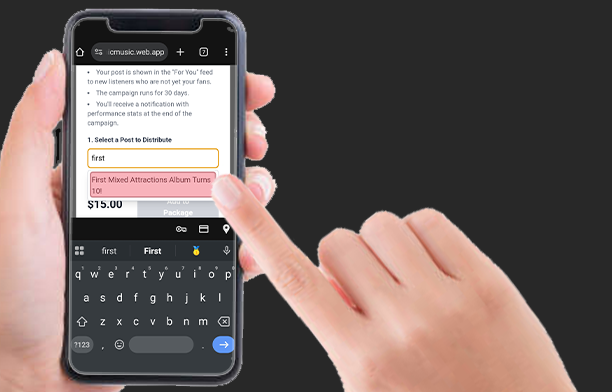
Step 5. Select ‘Add to Package’
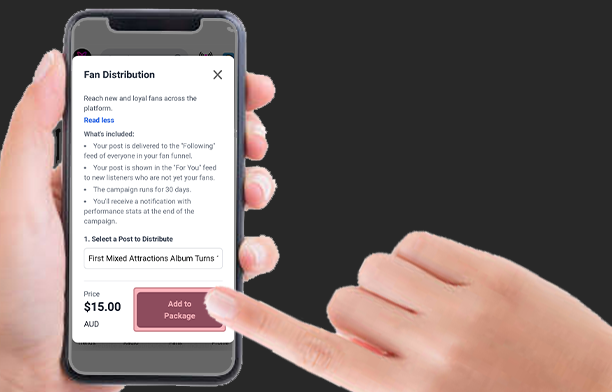
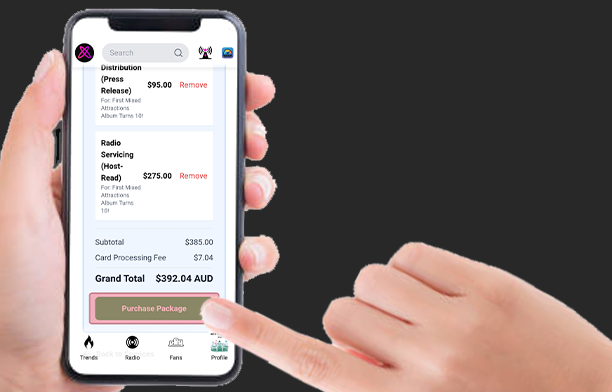
Step 6. Confirm your selection in the Service Package Summary & tap ‘Purchase Package’ to checkout.
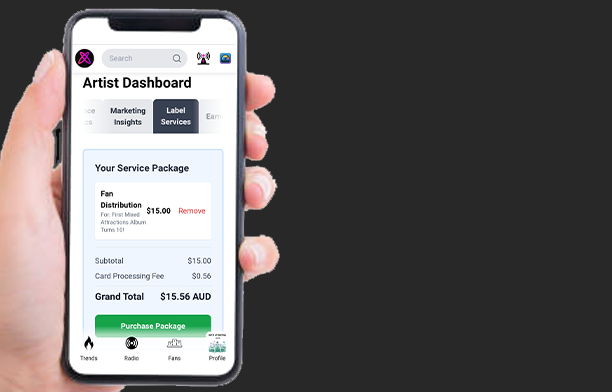
Note: Both the service type and content name are displayed in the card Summary.
How to set up Media Distibution:
Step 1. Open the Press Manager & select Media Distribution
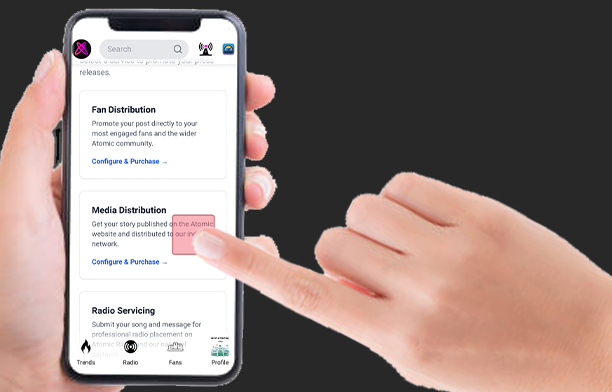
Step 2. Select a Placement Type & Press Post, or Upload Content
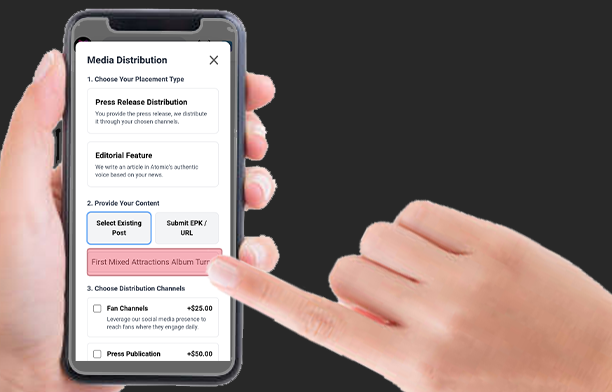
Step 3. Select Distribution Channels and ‘Add to Package’
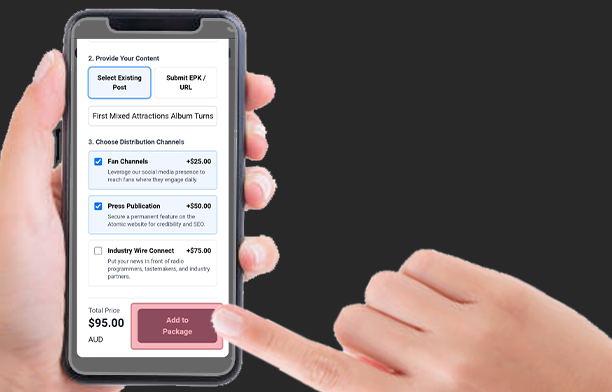
Step 4. Confirm your selection in the Service Package Summary & tap ‘Purchase Package’ to checkout.
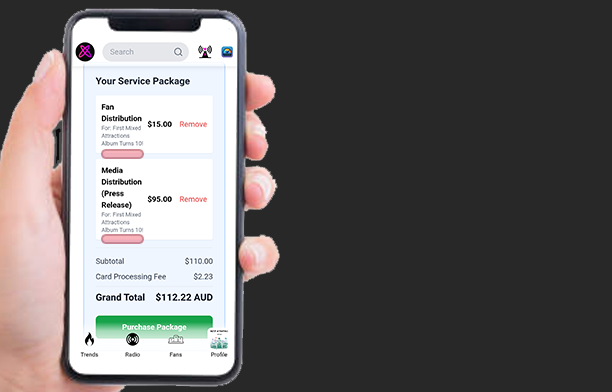
How to set up Radio Servicing:
Step 1. Open the Press Manager & select Radio Servicing
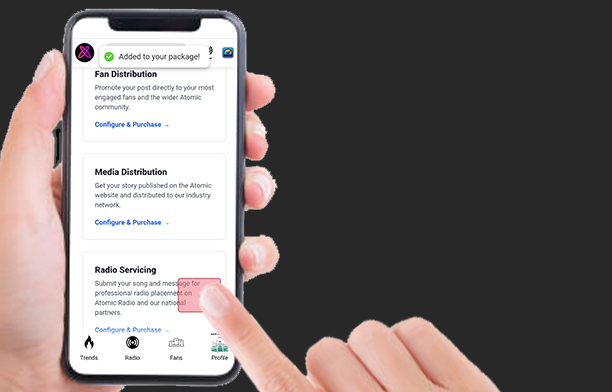
Step 2. Select a Placement Type & upload Pre-Recorded content if selected.
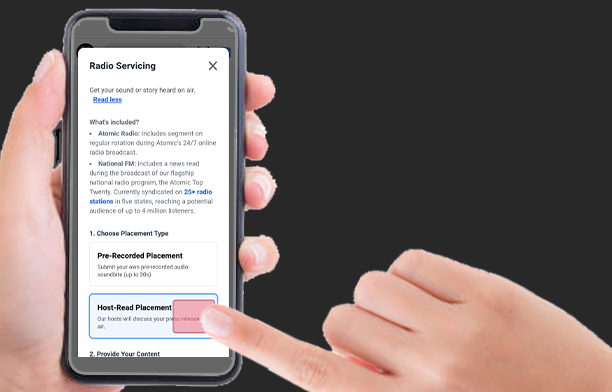
Step 3. Select Distribution Channels and set the duration & ‘Add to Package’
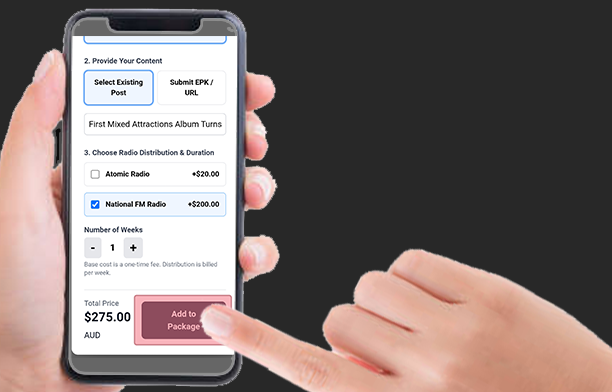
Step 4. Confirm your selections in the Service Package Summary & tap ‘Purchase Package’ to checkout.
How to configure Label Services in the Catalog Manager:
Step 1. Open the Catalog Manager in the Label Services section
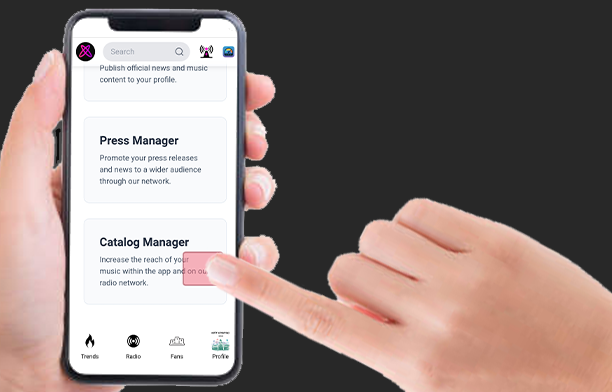
Step 2. Select a service card
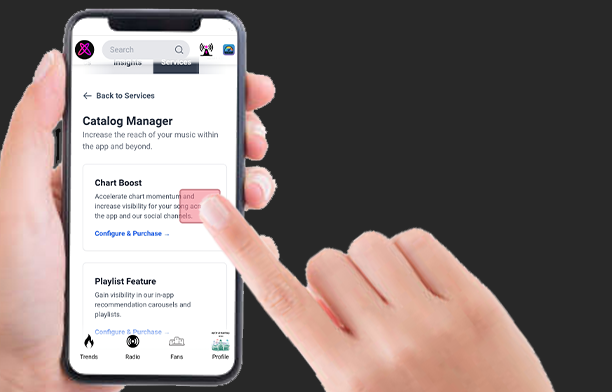
Step 3. Select a song from your Discography by searching
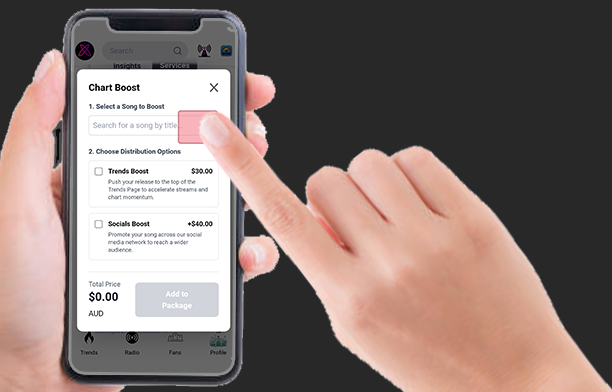
Step 4. Confirm your Distribution selections & tap ‘Add to Package’
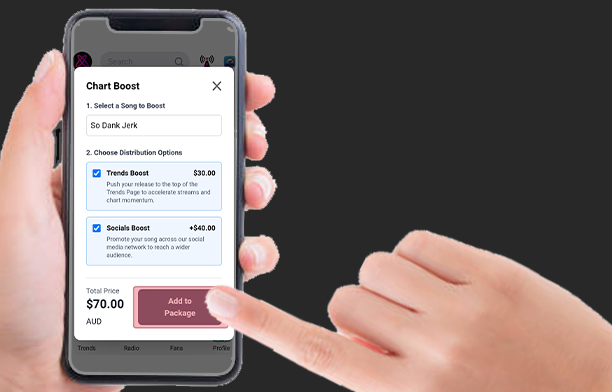
Step 5. Build a Service Package using a combination of Press & Catalog Manager Services
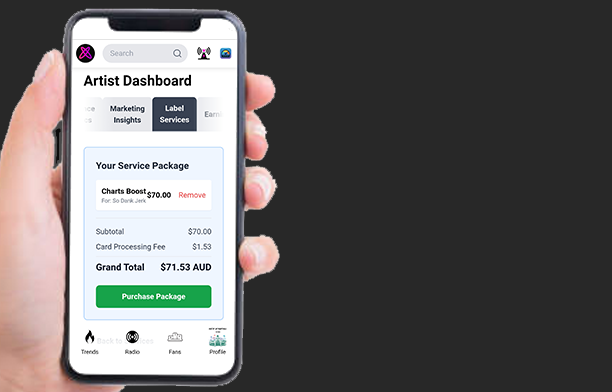
Step 6. Explore other Catalog Manager service options to build a package suited to your needs